10 Best Short Throw Projectors for Golf Simulator in 2026
Disclosure: As an Amazon Associate we earn from qualifying purchases.
BenQ TH671ST is the pick for golfers who also want a responsive gaming projector with a 100-inch image from just 5 feet away.
Choosing a projector for your sim can get tricky when throw distance, brightness, and image size do not line up with your room. With a short throw projector for golf simulator use, placement matters as much as the picture, and that is where many shoppers get stuck.
These picks cover tight rooms, brighter spaces, and models built for easier setup.
Our Top Picks
Top 10 Short Throw Projectors for Golf Simulator Review
Pros and cons are taken from each product's listing details.

BenQ TH671ST 3000 Lumens 1080p Short Throw Home Entertainment Projector
- ✓Native Full HD 1080p
- ✓3000 lumens brightness
- ✓100 inch image from 5 feet
- ✓3-year limited coverage
BenQ TH671ST gives you native Full HD 1080p resolution, 92% Rec. 709 color accuracy, and 3000 lumens for a sharp, bright image in a home golf simulator or entertainment setup. Its short throw design lets you create a large screen from close range, and it supports projection up to 300 inches, making it a strong choice when you want immersive visuals in limited space.
This projector is especially appealing if you also care about gaming, because its ultra-fast low input lag and refresh rate are built for smooth play with minimal motion blur. You also get auto vertical keystone, dual HDMI, a built-in speaker, and 3-year limited parts and labor coverage. Buy it if you want a versatile short throw option for both golf simulation and gaming.
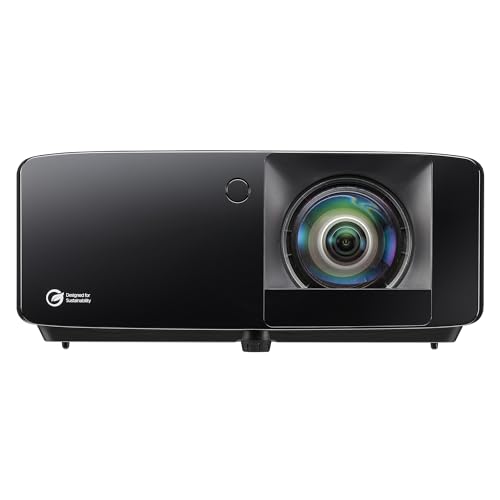
Optoma GT2400HDR
“Bright, durable projection for demanding rooms.”
- ✓4200 ISO lumens
- ✓Laser light source
- ✓IP6X dust protection
- ✓Long 30,000-hour light source
Optoma GT2400HDR is a Full HD 1080p short throw laser projector built for golf simulation and gaming setups that need strong brightness. With 4,200 ISO lumens, it can deliver a visible image in brighter rooms, helping your simulator screen stay clear and easy to see. Its short throw design makes it suitable for tighter indoor spaces where placement flexibility matters.
This model also includes IP6X-rated dust protection, which is useful if your simulator lives in a garage or other dust-prone area. The 30,000-hour DuraCore laser light source adds long-term reliability with less upkeep. Choose it if you want a bright, durable projector for golf simulation, especially when you need a low-maintenance laser option for frequent use.

ZCGIOBN 4K Projector
“Packed with smart controls and automated setup.”
- ✓Google TV OS
- ✓Auto focus and auto keystone
- ✓40W Dolby Audio
- ✓Wi-Fi 6 and Bluetooth 5.4
- iNot a short throw model
The ZCGIOBN 4K projector is built for golf simulator, home theater, and gaming use with 2200 ANSI lumens, 4K HDR10 support, and 6-color LED technology. It is designed to show realistic fairway textures, rich contrast, and detailed visuals, which helps when you want your simulator image to look sharp and immersive in a garage or basement setup.
You also get flexible ceiling or tabletop placement, ultra-low latency with MEMC for smoother motion, and Google TV for built-in streaming apps. HDMI 2.1 support makes it easy to connect a golf simulator PC or gaming console, while the fully sealed optical engine helps protect against dust. Buy it if you want a feature-rich all-in-one projector for simulation and entertainment.

ViewSonic LSD400HD-ST Bright 4000 Lumens 1080p Short Throw Laser Projector
“Fits close to the screen and stays easy to see.”
- ✓0.5 short throw
- ✓Dedicated Golf Mode
- ✓4,000 ANSI lumens
- ✓IP6X sealed optical engine
ViewSonic LSD400HD-ST is a bright 1080p short throw laser projector made for business, classroom, and golf simulator use. It can project a 100-inch Full HD image from just 1.1 meters away, which is ideal if your simulator space is tight. With 4,000 ANSI lumens, it stays visible in rooms that still have some ambient light.
This projector stands out for its dedicated Golf Simulation Mode, which boosts greens and blues to make fairways and course details look more lifelike. It also offers H/V keystone correction, network management support, and an IP6X-rated sealed optical engine for reliable 24/7 operation. Choose it if you need a professional-grade short throw projector for serious simulator use.

Optoma GT1080HDR
“A compact setup with strong brightness and fast response.”
- ✓100 inch image from just over 3 feet
- ✓4K HDR compatibility
- ✓Low input lag
- ✓15,000-hour lamp life
Optoma GT1080HDR is a Full HD 1080p short throw projector with 3,800 lumens and 4K HDR compatibility, making it a strong choice for golf simulator and home entertainment setups. Its short throw lens can project a massive 100-inch image from just over 3 feet away, helping you save space while reducing shadows in front of the screen.
It is also built for responsive gaming, thanks to its low input lag, and the bright output helps keep images vivid even with lights on. You get dual HDMI, USB power for streaming devices, VGA, and a built-in 10W speaker for simple setup. Buy it if you want a versatile short throw projector for golf simulation, gaming, and movies.

GoSports Golf Simulator Projector Cover with Turf
“Protects a projector placed on the floor.”
- ✓Floor-mounted enclosure
- ✓Protective polycarbonate panel
- ✓4 air and cord vents
- ✓No assembly required
- iDoes not provide waterproof protection
- iInterior dimensions limited to 14 x 15.2 x 5.7 inches
- iOnly recommended for low-heat LED projectors
GoSports Golf Simulator Projector Cover with Turf is a floor mounted enclosure made for LED projectors in a golf simulator setup. Instead of ceiling mounting, you can place your projector on the floor and cover it with a turf edition enclosure that blends into your sim space. That makes it useful if you want a simpler, cleaner installation.
The cover uses ultra-durable HDPE and a protective polycarbonate panel to help guard your projector from mishits at any swing speed. It includes side vents for airflow and cord management, and the front panel can be removed for extra cooling. Choose it if you want protection and convenience rather than a mounted projector installation.

KOGATA Short Throw Projector 4K with AI Auto Focus Built-in Apps Dolby Audio
“Flexible placement with a very light build.”
- ✓270° rotatable stand
- ✓Electric focus
- ✓4K support
- ✓2.5 lb portable design
- iNo Wi-Fi or Bluetooth
The KOGATA short throw 4K projector is a smart home entertainment model with built-in apps, AI auto focus, WiFi, Bluetooth, and Dolby Audio. It is designed to reduce setup hassle by combining short throw projection with a true smart TV OS, so you can stream Prime Video, YouTube, Disney+, Apple TV, and Live TV directly from the projector.
It also offers native 1080p resolution with 4K support from apps, plus instant focus using Time-of-Flight technology for quick setup. Dual 10W full-range drivers provide immersive sound, and the short throw design works well in compact rooms. Buy it if you want a portable, feature-packed projector for entertainment rather than a dedicated golf simulator unit.

Goiaey [5000 ANSI/VIDAA Live TV/65W Audio] 4K-Projector with Massive Apps
“Built for big-screen use with voice and app control.”
- ✓VIDAA OS
- ✓65W audio
- ✓Voice control
- ✓1:1 short throw design
- iNot suitable for bright room
This Goiaey 4K projector centers on brightness, smart features, and flexible use with 5000 ANSI lumens, VIDAA Live TV, and support for many official apps. It is designed to deliver bright, clear images even with some light in the room, while the built-in 65W audio adds stronger sound for a living room or outdoor setup. You can control it with voice or a smartphone app.
For placement, the 1:1 short throw design can project a 100-inch image from 8 feet, and the 360° rotatable stand lets you aim it at walls or ceilings. HDMI CEC, HDMI ARC, and multiple ports add convenience for devices. Choose it if you want a very bright, highly flexible projector for home entertainment rather than a focused golf simulator model.

Promethean UST-P3 Ultra Short Throw Projector
“A simple ultra-short-throw choice for compatible setups.”
- ✓Ultra short throw format
- ✓Promethean branding
Promethean UST-P3 is an ultra short throw projector, which means it is designed to sit very close to the display surface while creating a large image. That kind of setup is useful when you need to save room in front of the screen, reduce shadows, and keep your installation compact. It is a practical option for environments where space is tightly managed.
Because it is an ultra short throw model, this projector is well suited to classrooms, collaborative spaces, or specialized simulation setups that benefit from close-wall projection. The main strength is its ability to deliver a big image from a very short distance, which can help keep your room organized and uncluttered. Buy it if you need UST flexibility over general entertainment features.

Sainyer Mini Projector 4K Support
“A small projector with flexible aiming options.”
- ✓270° rotatable stand
- ✓Up to 200 inch image
- ✓Electric focus
- ✓Multiple connectivity options
- iNo Bluetooth or Wi-Fi capabilities
- iNo built-in apps
The Sainyer mini projector supports 4K and Full HD 1080P input, giving you a compact short throw option for indoor or outdoor use. Its 270° rotatable stand and electric keystone correction make it easy to aim the image from many angles, including ceiling projection. That flexibility makes it useful when your setup changes often or space is limited.
It can project up to a 200-inch screen and includes multiple connectivity options such as HDMI, USB, and AUX for phones, TV sticks, consoles, and laptops. iOS wired connectivity also makes phone mirroring simple. Choose it if you want a portable projector with broad compatibility and easy angle adjustment for casual viewing.
How to Choose a Short Throw Projector for Golf Simulator
Match the room
Start with the space you actually have. A smaller room usually needs a shorter throw so the projector can sit close without blocking your swing or casting shadows. Look at the distance to the screen and the image size together, not just one of them.
Ceiling mount, tabletop, and floor placement each affect how easy the setup feels. If the room is tight, a model designed for closer placement usually gives you more room to move and less chance of reworking the whole layout later.
Check brightness
Brightness matters when your room is not perfectly dark. Higher output helps the image stay visible in garages, basements, and multipurpose spaces. If you plan to use ambient light, choose a projector described with enough output for that setting.
It also helps to think about contrast and color handling. Those details can make fairways, greens, and text look clearer, especially when you are using the projector for both golf practice and other screen time.
Look at setup tools
Auto focus, auto keystone, and screen-fit features can save time during setup. These tools are useful when the projector may get moved, bumped, or placed at an angle. They are not a substitute for good placement, but they can make setup less fussy.
Connectivity matters too. Check for the inputs you need for your PC, console, or streaming device, and think about whether built-in apps or wireless options matter in your room. The best fit is the one that matches your gear without extra work.
More to Consider for Short Throw Projectors for Golf Simulator
Audio needs
Built-in speakers can be enough for casual use, but larger rooms often benefit from stronger sound or easy external audio connections. If you already use speakers or a soundbar, check how the projector sends audio out and whether the controls are simple to manage.
Dust control
A sealed or dust-protected design can matter if the projector will live in a garage, studio, or other dusty space. Less dust inside the unit can help reduce maintenance hassles over time. This is especially useful when the projector stays set up for long periods.
Control style
Some people want a remote and a basic menu, while others want voice commands or phone control. Think about who will use the projector most often and how often the settings will change. A control style that feels natural can make the whole setup easier to live with.
Common Mistakes to Avoid When Buying Short Throw Projectors for Golf Simulator
Ignoring swing space
A projector can look great on paper and still fail in a room where the image path cuts into your swing area. Measure the space where the unit will sit and check how the throw distance matches your screen. That helps avoid shadows, awkward placement, and extra setup work.
Overlooking light levels
A dim image in a bright garage or basement can make distance and alignment harder to judge. Brightness needs to match the room, not just the screen size. Choose a model with enough output for your lighting conditions, especially if the space is used during the day.
Skipping the inputs
It is easy to focus on image size and forget what you will plug in. If your simulator PC, console, or streaming device needs certain ports, check those first. A projector with the wrong connections can force adapters and extra cables you did not plan for.
Choosing on features alone
Auto focus, apps, and sound can be useful, but they do not replace a setup that fits the room. A model with many extras may still be awkward if the throw distance or placement style is wrong. Start with the space, then decide which extras are worth having.
Frequently Asked Questions
How much brightness should I look for?
Choose enough output for the light in your room.
Which pick is easiest to set up?
ZCGIOBN stands out for auto focus, auto keystone, and a ceiling or tabletop setup. Goiaey also adds smart AI auto focus, auto keystone correction, and auto screen fit.
Which one works best in a tight room?
ViewSonic is the most direct fit for a tight room because it projects a 100-inch image from just 1.1 meters away. BenQ also keeps the image close with a 100 inch image from 5 feet. Goiaey says 100 inches from 8 feet, which is less compact than those two.
Which model is better for gaming use too?
BenQ is built around low input lag and a refresh rate that matches the max output of Xbox One X and PS4 Pro. Optoma GT1080HDR also lists ultra-low input lag, and KOGATA describes low latency with MEMC. If gaming matters as much as golf practice, those three are the most aligned.
Which option has the most flexible placement?
Goiaey gives the broadest placement range with a 360° rotatable stand and projection from many angles. Sainyer also offers a 270° rotatable stand, electric focus, and ±60° angle adjustment. KOGATA is lighter at 2.5 lb and supports short throw placement, which helps if you move it often.
Final Verdict
BenQ is the cleanest all-around pick because it combines native Full HD 1080p, 3000 lumens, low input lag, and a 100 inch image from 5 feet. It also adds dual HDMI and a 3-year limited coverage period, which makes it a strong fit for golfers who also want game use.
Optoma suits buyers who want a brighter laser model with dust protection, while ZCGIOBN fits people who want Google TV and auto setup tools.